
tui-ascii-mapper
A terminal-based map editor for creating ASCII maps with Unicode symbols and ANSI 256-color support. It supports both keyboard and mouse. Built with Bubble Tea.
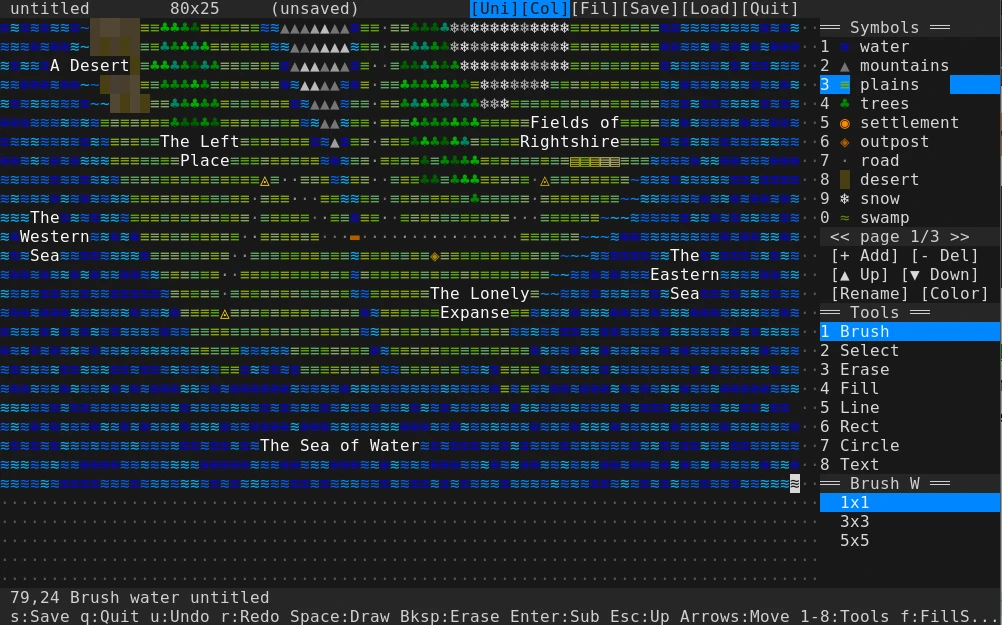
Features
- 8 drawing tools: Brush, Select, Erase, Fill (flood fill), Line, Rectangle, Circle, Text labels
- 30 built-in terrain types: Or make your own. Choose multiple colors!
- Unicode/ASCII toggle: switch between Unicode symbols and ASCII fallbacks
- 256-color ANSI support: built-in color picker to assign colors per terrain or text label
- Submaps: press enter to drill down into a sub-map (e.g. a town map)
- Text labels: place movable text strings on a layer above the map
- Save/Load: maps save in a custom YAML format, but have easy copy/paste
Controls
Keyboard
| Key | Action |
|---|---|
| Arrow keys / h/j/k/l | Move cursor |
| Space / Enter | Use tool at cursor / move text / make shape |
| 0-9 | Select symbol |
| Shift + 1-8 | Select tool |
| - / = | Previous/next palette page |
| [ / ] | Decrease/increase brush width |
| f | Toggle fill shapes |
| u | Toggle Unicode/ASCII modes |
| c (in Text tool) | Open color picker for text label |
| e (in Text tool) | Edit text label at cursor |
| Esc | Cancel / go up 1 map level |
| Backspace / x | Erase cell / delete text label |
| arrow keys (in text drag) | Move dragged text label |
| u | Undo |
| r | Redo |
| s | Save map |
| q | Quit |
Configuration
Edit config.yaml to customize terrain symbols, colors, keybindings, and default map size. The config is loaded from the directory next to the binary, or from $XDG_CONFIG_HOME/tui-ascii-mapper/config.yaml.
Building
go build -o tui-ascii-mapper
./tui-ascii-mapper
AI Disclosure
This is 100% unreviewed, vibe coded slop. I needed a TUI ASCII map-making tool and couldn’t find one and threw this together quickly. It has bugs.
License
0BSD. Do anything you want.