
tts-audiobook-generator (TAG)
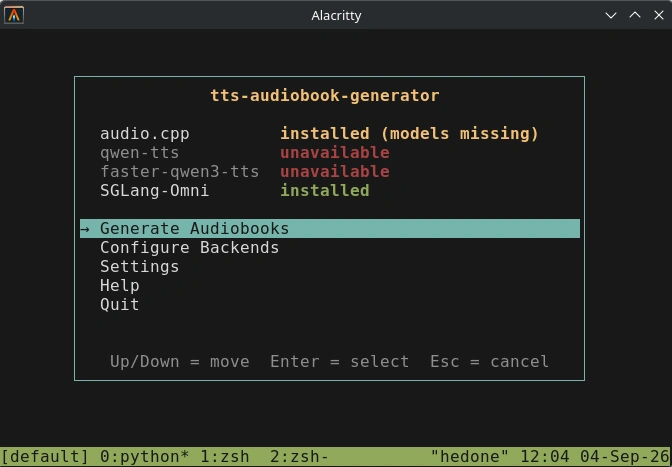
Generate audiobooks from books (epub, txt, pdf) using text-to-speech backends such as audio.cpp, qwen-tts, and SGLang-Omni. TAG installs and manages requirements, backend servers, and TTS models automatically.
Overview
The converter sends text extracted from your books to a locally running TTS server and assembles the returned audio into a single audiobook file.
- Input:
.txt,.pdf, or.epub - Output:
.m4b,.mp3,.ogg, or.flac - Supports audio.cpp, qwen-tts, faster-qwen3-tts, and SGLang-Omni backend servers
- Automatic metadata (title/artist/album tags, chapter track numbers) and a generated cover
- Supports text-to-speech, voice cloning, and voice design
| Backend | Description |
|---|---|
| audio.cpp | C++ TTS backend that supports many models |
| SGLang-Omni | Multi-model server for big models and NVidia GPUs |
| Qwen-TTS | Qwen demo server (qwen-tts-demo); one model at a time — CustomVoice, Base or VoiceDesign |
| Faster-Qwen-TTS | Qwen server with 2-8x faster inference for NVidia GPUs |
Prerequisites
- Python 3.12+
- ffmpeg
Quick Start
- Download the project
git clone https://git.historia.vg/git/tts-audiobook-generator
cd tts-audiobook-generator
- Put your files in the directories
./input - Text files to be processed (epub, etc.)
./output - Audio files will output here
./voices - .wav files of voices to clone (10-20 seconds)
Run
python audiobook.py. It will automatically create a virtual environment and install its requirements.Go to
Configure Backends > Install Backend > audio.cpp. This backend supports numerous TTS models.Use the wizard to install one or more TTS models.
qwen3_tts_1_7b_base_q8_0 is a good model for cloning.
qwen3_tts_1_7b_customvoice_q8_0 is good for built-in speakers.
The script downloads a prebuilt audiocpp_server (macOS and Windows; no compiler or Xcode needed) — or builds it from source on other platforms — and downloads the models.
Go to
Generate Audiobooksin the main menu to process the input files into audiobooks. The script will automatically start and stop the necessary backend server.
CLI Options
| Flag | Example | Description |
|---|---|---|
--backend {audiocpp,qwen,faster,sglomni} |
audiocpp |
TTS server to use. Required: there is no default backend. |
--format {mp3,m4b,ogg,flac} |
m4b |
Output format (default: the AUDIO_FORMAT setting in app/converter/config.py, m4b). |
--voice <name> |
Vivian |
Voice to request. For faster this is the key in voices.json (required). For the Qwen CustomVoice model this is the speaker (Ryan, Vivian, etc.). For audio.cpp it is a server-side clone voice: required for clone-only families (e.g. Chatterbox), optional on mixed families and unused by pure-TTS models (e.g. Supertonic). |
--input <dir> |
./input |
Directory containing the books to convert (default: the INPUT_DIR setting in app/converter/config.py, ./input; relative paths resolve against the project root). |
--output <dir> |
./output |
Directory to write finished audiobooks to (default: the OUTPUT_DIR setting in app/converter/config.py, ./output). |
--input-file <file> |
books/dune.epub |
Convert one specific book (.txt/.pdf/.epub) |
--output-file <file> |
out/dune.mp3 |
Base output path for the audiobook from --input-file |
--instructions "..." |
"A warm adult female narrator with a British accent" |
Voice design or style instruction. Usually used for voice design models, some clone models also accept this. Families that read it as a request option (e.g. --option instructions= like BreezeTTS) get it translated automatically. |
--speed <n> |
1.0 |
Playback speed, pitch-preserving (1.0 = normal). A normal-speed copy is also output. Defaults to the SPEED setting in app/converter/config.py. |
--single-file |
Merge all chapters into a single file. m4b is always one file. |
|
--language <lang> |
English |
Output language for the synthesized speech. May add an accent even if the text is English. |
--debug |
Dump each chunk’s raw audio and sent text to debug/ and log every request. Forces the DEBUG setting in app/converter/config.py on for this run. |
|
--api-url <url> |
http://10.20.30.40:8080 |
URL of an external TTS server. Accepts host:port or a full http(s):// URL. Without it the CLI starts and stops the backend’s managed server itself. |
--model <id> |
qwen3_tts_1_7b_base_q8_0 |
audiocpp: Choose the TTS model from server.json (required on multi-model servers; auto-selected on single-model servers). sglomni: the catalog model key (e.g. higgs_audio_v3_tts; required when several models are installed) |
--option KEY=VALUE |
emotion=neutral |
audiocpp: Some models support custom options with this (e.g. emotion=neutral) |
--clone <path> |
./voices/speaker.wav |
Path to reference audio (wav) for voice cloning (e.g. ./voices) |
--transcription "..." |
"Hello! This is a sample of my voice." |
Override whisper auto-transcription with manual audio transcript. |
--no-transcription |
Skip auto-transcription of the reference audio. |
The TUI settings are configured in app/converter/config.py
Example Commands
Use --backend and --api-url to point at an existing backend server. Otherwise without --api-url, TAG will start/stop its own managed server instance automatically (if installed via TUI)
python audiobook.py --backend audiocpp --model qwen3_tts_1_7b_base_q8_0 --voice narrator

python audiobook.py --backend audiocpp --model qwen3_tts_1_7b_customvoice_q8_0 --voice Vivian

python audiobook.py --backend audiocpp --model Qwen3-TTS-12Hz-1.7B-VoiceDesign-GGUF \
    --instructions "A warm adult female narrator with a British accent"

python audiobook.py --backend faster --voice narrator

python audiobook.py --backend sglomni --model higgs_audio_v3_tts

python audiobook.py --backend sglomni --model moss_tts_local --clone voices/narrator.wav

python audiobook.py --backend sglomni --model qwen3_tts_1_7b_voicedesign \
    --instructions "Warm adult female narrator with a British accent"

python audiobook.py --backend audiocpp --api-url http://10.20.30.40:8080 --voice narrator

python audiobook.py --input-file the_odyssey.epub --output-file the_odyssey.mp3 \
    --format mp3 --single-file
Manual TTS Backend Setup
If the TUI auto-install doesn’t work for some reason, you may need to set up the backends manually.
./audiobook.py can also connect to external servers running these backends if you want to completely manage your own install. The TUI will automatically look for and connect to the API URLs configured in settings. For CLI use, point at --api-url for an external server; without it the CLI starts and stops a locally-installed backend server around the run.
Tips
Transcription affects the output a lot. The automatic Whisper transcript is not always perfect. Manual transcription is better.
Even tiny amounts of pause between phrases in the sample audio can have a big impact. Try increasing or decreasing them or find a sample with different cadence.
Uninstall
Everything the tool installs lives inside the project folder — venvs, the audio.cpp checkout, cloned repos, downloaded models, logs, and generated audiobooks — so removing it removes all of that:
rm -rf tts-audiobook-generator
A few caches land in your home directory. Only delete these if you don’t share them with other tools:
~/.cache/huggingface/hub— TTS model weights and Whisper transcription models (delete only themodels--*directories to keep the rest)~/.cache/whisper— OpenAI Whisper models (only used when the fallback transcriber runs)~/.cache/pip— downloaded wheels (shared with pip itself)
rm -rf ~/.cache/huggingface/hub ~/.cache/whisper ~/.cache/pip
License
MIT
Credits
- Qwen3-Audiobook-Converter by WhiskeyCoder. This project was originally built upon this.
- Qwen3-TTS voice model.
- audio.cpp inference engine for the
audiocppbackend. - SGLang-Omni serving framework for the
sglomnibackend.