
Soon
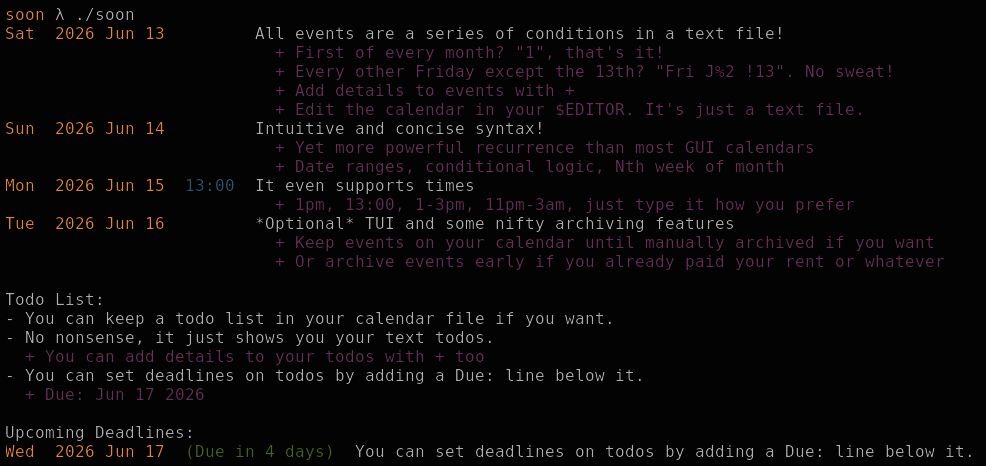
Soon is a minimalist, text file based, CLI calendar inspired by When. It has simple, concise syntax but supports recurring cases more complex than most calendars.
- Schedule events in a text file with concise syntax
- Group, sort, comment, and columnize events to keep files neat
- Add details to events
- Archive events to remove them from your schedule (e.g. paid bill)
- Optionally keep events on calendar until dismissed (e.g. missed oil change)
- Todo list with upcoming deadlines
- Fun
In terms of features and complexity, Soon lies between When and Remind but aims to be less verbose than either.
Build
Install Nim, then
git clone https://git.historia.vg/git/soon
nimble build
./soon
Quick Start
Run
soon -eto edit your default calendar. On first run, soon will generate a config and calendar file under $XDGCONFIGHOME/soon.Check the example calendar and add some events/todos.
Run
soonto see your agenda for the next 14 days. Runsoon -cmtdto print a reference calendar, next month’s agenda, todos, and upcoming deadlines.Run
soon -ito start interactive mode and archive events or mark todos as done. Move with arrow keys or j/k. Toggle with Space, d, or x. Press Esc or q to quit.Run
soon -sto edit your config file.
Example Calendar
# Simple Dates
2025 Jul 17,  Single day event
Fri 8pm,      Every Friday at 8pm
Jan 1,        Jan 1 every year
Tue,          Every Tuesday
1,            1st of every month

# Logic Conditions
Mon Fri,  Mondays and Fridays
Fri !13,  Every Friday except the 13th

# Ranges
(Jul 7 2024)-(Jul 13 2024),  Shark Week
July 7-13 2024,              Shark Week
Mon-Fri 9am-5pm,             Work all day

# Uncommon recurrence patterns
J%3,     Every third day (See: Advanced Recurrence)
Fri 1W,  First Friday of the month

# Add details to the above event with +
2025 Aug 1, Doctor's Appointment
+ Address: 123 Oak Street, Woodsville
+ Phone: +1 555-555-5555

# Todos start with a hyphen
- Buy milk
- Read War and Peace
- This todo has a parsable deadline
  + Due: Aug 15 2025
.soon file syntax
Each line is a series of date conditions followed by , and the event name
Lines starting with - are todos
Lines starting with + are attached to the above event/todo to add details or deadlines. I like indenting these but you don’t have to.
Lines starting with # are comments and ignored, as are blank lines.
Date Condition Logic
Years, months, weekdays, days can be listed in any order. Months and weekdays can use full names or 3 letter short names.
Conditions of different types (e.g. a month and day) all have to be satified.
If multiple conditions of the same type exist (e.g. two days), only one has to be satisfied.
Prepend ! to any condition to mean NOT.
Jan 1,          January 1st
Jan 1 15,       January 1st and January 15th
Sun !(Dec 25),  Sunday, NOT December 25
Sat Sun Aug,    Saturday and Sundays in August
Date Groups
You can put a day, month, and optionally year in parentheses to treat it as a single date. This lets you use the date for ranges and with the ! operator like you’d expect.
Sun !(Dec 25),               Every Sunday except Dec 25. The ! does NOT expand to !Dec !25.
(June 25 2025)-(Sep 1 2025), Summer vacation
(Jun 25)-(Sep 1) 2025,       Alternative summer vacation
Ranges
You can specify ranges between conditions of the same type with a hyphen
Mon-Fri,                    Work every weekday
Jan 1-7 2025,               Las Vegas convention
(Jan 30 2025)-(Feb 3 2025), Ski trip
(Dec 25)-(Jan 2),           Christmas vacation every year
You can omit one end of a date range to mean before or after a certain date.
Fri -(Sep 12 2025),  Every Friday before (and including) Sep 12 2025
Fri (Sep 12 2025)-,  Every Friday after (and including) Sep 12 2025
First/last week(s) of Month
[N]W is the Nth set of 7 days of a month
[N]L is the Nth-from-last set of 7 days of a month
This is mostly useful for certain holidays
May 2W Sun,   Mother's Day (Second Sunday of May)
May 1L Mon,   Memorial Day (Last Monday of May)
1W Fri,       First Friday (of every month)
Time
You can express times in 24h format or AM/PM format. Your agenda will be sorted by the start time of events.
Fri 16:00,    With no am/pm, 24h time is assumed
Fri 12:00am,  Midnight
Fri 12pm,     Noon

# You can use ranges too
Fri 05:00-06:00,  Breakfast
Fri 12pm-1pm,     Lunch

# If you specify multiple times, the event will show up at each of those times
6am 12pm 6pm,  Walk the dog
Adding details to events
Any line starting with a + is attached to the nearest above event. This can be used for details about an event if you don’t want to put everything on one line.
2025 Jan 5 16:00, Doctor's Appointment
  + 123 Bookworm Road, New York, NY 12345
  + Dr. Raadt, +1 (555)-123-1234
Advanced Recurrence (Modified Julian Day J%x-y)
Soon supports using a Modified Julian Day as J. J is the number of full days since midnight November 17, 1858. Combined with the modulo operator % and an optional +/- offset this creates complex recurring events.
This condition returns true when the result is 0 (This is the opposite of how When works).
J%3,       Every third day
J%14-5,    Every other Saturday
J%14+2,    Every other Saturday (on the other weeks)
Sat J%2,   Every other Saturday expressed in a different way
Julian date modulus is weird, but it’s a concise way to express multiple uncommon recurring patterns without increasing complexity much for recurrence I virtually never need. Plus it’s an homage to When.
Footnote for astronomers and time nerds
The actual MJD is based on UTC, so Soon technically uses a rounded, modified Julian Day because it counts days since 1858-11-17 in your local time zone. This doesn’t matter in practice. It’s just a number that goes up by 1 every day. Soon’s MJD is off by 1 from When. When starts counting from JD 1 while Soon more correctly starts counting from JD 0.
Todo List
Lines in .soon files that start with - will show up on the todo list.
Start a line with + to attach it to the above todo.
Attach a line with + Due: DATE and it will show up in a list of upcoming deadlines.
- Wash car
- Clean room
- Give book back to Ada
  + Address: 555 Oak Street, Portland, OR

- Finish TPS report
  + Due: Aug 7 2025
You can delete finished todos from soon -i or just from your text editor.
Archive File
You can archive events in interactive mode with soon -i. This lets you archive an event like “Pay rent” early so you know it’s done. The default behavior is to delete the event from your calendar file when the last instance of the event is archived.
The archive file stores one entry per line. Event instances use date|name
2025-07-04|Doctor's Appointment
- Buy milk
showPastArchivedEvents and showFutureArchivedEvents determine if archived events are hidden from your agenda entirely or show up as (Archived).
Keep events on calendar until manually archived
In soon.conf, set alwaysShowUnarchivedEvents=true and old events will stick on your calendar until archived (regardless of the past setting). This means you will have to manually acknowledge every event.
Soon checks for events starting from startDate so you don’t get recurring events showing up from the 1970s. Basically, everything before this date is considered archived.
Why would I use this?
Soon is a When alternative with nicer syntax and scheduling features for a small niche of people who mainly edit their schedule directly in a text file. This group largely uses Remind or Org Mode. Soon has a few benefits over similar text file calendars:
Soon has the most concise syntax.
Soon:
Jul 1-7 2025, Vacation!
When:m=Jul & d>=1 & d<=7 & y=2025, Vacation!
Remind:REM Jul 1 2025 THROUGH Jul 7 2025 MSG Vacation!Soon can archive the next instance of “Pay quarterly bill” after its paid early to hide it from your agenda without affecting later instances.
You can optionally keep events on the agenda until manually archived. This mimics the behavior of keeping overdue calendar reminders in your email inbox.
Todos with upcoming deadlines and nothing else. It’s just a list in a text file.
Alternatives
- When - The simplest text file calendar that’s flexible enough for real world use.
- Remind - The most powerful, programmable calendar program ever made.
- Org Mode - Expansive text file based productivity system but an endless time sink for tinkerers.
You might also be interested in these which are text based but have somewhat different workflows: khal, calcure, Calcurse, Taskwarrior, calendar.vim, Emacs Diary, Plain Text Personal Organizer, Calendar.txt
Todo
- Create tests for date ranges that start/end on DST changes. The condition checker treats every event as midnight, might be an edge case.
- Julian modulus calculator (
soon -j Jun 5 2025> Outputs J and a table of common mod offsets) - Add calendar option to TUI
- CalDAV/.ics export? - Numerous CLI programs store calendars with .ics files directly, so it doesn’t make much sense to use Soon if you need to sync to a “main” calendar.
- Import?
License
MIT