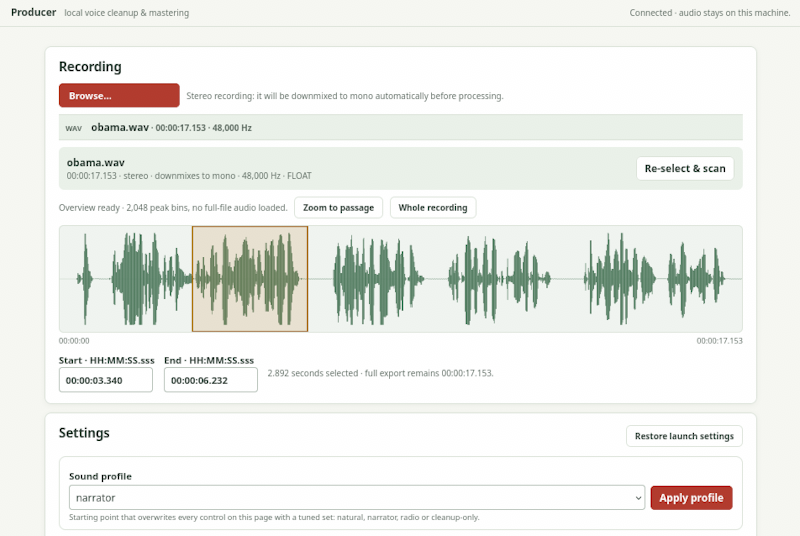
Producer
Local, offline speech cleanup and mono mastering for WAV recordings, launched
with a single script: producer.sh. The only AI backend is DeepFilterNet3;
FFmpeg provides filtering, dynamics, loudness normalization and encoding. There
is no MossFormer backend. Audio processing is local; initial dependency and
model setup requires internet access.
Defaults produce a 48 kHz, 24-bit mono WAV, using two-pass loudness
normalization targeting -19 LUFS and -1.5 dBTP. MP3 is optional, at
192 kb/s by default. Originals are never overwritten, including with
--overwrite.
Quick Start
./producer.sh process recording.wav
The first run bootstraps everything the program needs into lib/runtime/:
a managed Python for the application (3.13), the application dependencies, a
bundled FFmpeg, and — on first AI use — the separate pinned Python 3.11
DeepFilterNet3 environment and model weights. Every
later run reuses that runtime, including fully offline once the needed assets
are present. Nothing is installed outside this directory: no PATH changes,
no binaries on your system, no sudo, and nothing written to your home
directory.
Requirements for the first bootstrap: a glibc Linux with bash, and either
an existing uv or a Python 3 with venv support (python3 -m venv). Download
trust is PyPI (uv, wheels), Astral’s Python distribution, and — for AI —
download.pytorch.org plus the pinned model host. There is no curl-to-shell.
./producer.sh doctor # check tools and driver, no AI downloads
./producer.sh setup --device cuda # install and self-test the AI backend
./producer.sh process recording.wav --device cuda --mp3
Manage the NVIDIA driver yourself, using the appropriate packages for your
GPU and kernel. Check nvidia-smi before CUDA setup. The launcher never
installs drivers or a system CUDA toolkit. The pinned CUDA backend uses
PyTorch’s CUDA 12.1 wheels and needs a compatible NVIDIA driver on Linux
x86_64. For CPU use, replace cuda with cpu. The default auto selects
based on availability; explicit cuda fails rather than silently using CPU.
Moving or renaming the directory
Move or rename the whole directory freely; nothing breaks. The next launch
detects that the runtime moved, drops only the path-bound environments, and
rebuilds them from the intact download caches — usually within seconds and
without re-downloading. Models, caches, and recordings are preserved.
./producer.sh --rebuild process ... forces the same repair after you edit
the source code under lib/project/.
Removing the program
Delete the directory. Recordings and their outputs always live wherever the
inputs are (or where you point --output/--output-dir), never inside the
runtime, so there is nothing else to clean up.
Everyday Use
# Master with the natural profile; outputs appear next to the input:
# recording.natural.wav, recording.natural.report.json
./producer.sh process recording.wav
# Other starting points; optional MP3 alongside WAV and report
./producer.sh process recording.wav --profile narrator --mp3
./producer.sh process recording.wav --profile radio
./producer.sh process recording.wav --profile cleanup-only
# Batch: every input keeps its outputs beside itself, so same-named files in
# different directories never collide
./producer.sh process take1.wav take2.wav --mp3
# Explicit destinations instead of the default
./producer.sh process recording.wav --output-dir delivery --mp3
./producer.sh process recording.wav -o delivery/episode.wav
# Stereo requires an explicit choice; final export is always mono
./producer.sh process stereo.wav --channel left
# Alternatives: --channel right, or --channel mix (equal-weight average)
# Explicit non-AI fallback: never selected automatically after an AI error
./producer.sh process recording.wav --denoiser fft --fft-reduction-db 6
./producer.sh process recording.wav --no-denoise
# Measurements as JSON on stdout, progress/logs on stderr
./producer.sh analyze recording.wav > analysis.json
Default outputs are written beside each input:
<input-dir>/<stem>.<profile>.wav, plus <stem>.<profile>.report.json, and
<stem>.<profile>.mp3 when requested. Previews default to
<input-dir>/<stem>.<profile>.preview.wav. --output-dir collects all
results in one directory instead; -o/--output sets one explicit WAV
destination (single input) and cannot be combined with --output-dir.
Existing outputs or sidecars cause an error unless --overwrite is supplied.
Duplicate batch output names require separate runs with distinct --output
paths. Processing accepts mono or stereo WAV inputs, not surround audio; it
does not preserve stereo. Avoid mix for opposite-polarity channels, which
can cancel the voice. The whole batch plan (all inputs, all outputs, all
sidecars) is validated before any input is processed.
| Profile | Intended starting point |
|---|---|
natural |
Mild EQ, 2:1 compression, light de-essing and normalization |
narrator |
Gentler 1.6:1 compression, slower attack, wider loudness range |
radio |
Stronger 3.5:1 compression, more warmth/presence, narrower range |
cleanup-only |
Denoising and highpass; no leveling, EQ, compression, de-essing, normalization or limiter by default |
These presets are engineering starting points, not tuned by listening to your recording or validated as universally good sounding. Listen before publishing.
Configuration
There is no config file at the root on purpose: configuration is only loaded
from an explicit --config path. A complete annotated reference with
natural-profile defaults lives at
lib/project/examples/voice.toml.
./producer.sh process recording.wav --config lib/project/examples/voice.toml
./producer.sh process recording.wav --denoise-strength 0.65 --no-eq --hum-hz 50
./producer.sh process recording.wav --set 'denoise_strength=0.65' --set 'device="cpu"'
# Inspect or generate resolved settings without downloading AI
./producer.sh config --profile narrator
./producer.sh config --profile radio --json
./producer.sh config --profile natural > voice.toml
./producer.sh config --config voice.toml --no-compression
./producer.sh process --help
Settings have named flags: replace underscores with hyphens, such as
true_peak_db -> --true-peak-db. Booleans support both forms, such as
--eq and --no-eq. Repeated --set KEY=VALUE accepts TOML values (strings
may also be unquoted). Unknown keys, incorrect types and out-of-range values
are rejected. Select presets with --profile; --set profile=radio also
selects and validates the profile before applying its defaults — except for
preview, where profiles come from --profiles and a profile override via
--set is rejected so file names always match the rendered configuration.
Precedence is defaults, selected profile, TOML values, named flags, then
--set (last assignment wins). --profile selects ahead of a file’s
profile, but other explicit file values still override the selected preset.
A full natural config therefore masks narrator/radio settings; remove keys you
want the preset to supply.
--no-normalize alone leaves the default limiter on. Use
--no-normalize --no-limiter to disable both. Normalization requires
limiting, so --no-limiter alone is invalid with normalizing profiles.
Denoising can be bypassed with --no-denoise, --denoiser none, or
--denoise-strength 0.
Previews
./producer.sh preview recording.wav --start 10 --duration 30 \
--profiles natural narrator radio cleanup-only
Previews go beside the input by default, with reports and optional MP3s.
Start must be nonnegative; duration must be greater than zero and at most 300
seconds. The default comparison includes natural, narrator and radio.
Previews force normalization and limiting, even for cleanup-only and
when --no-normalize is given, to compare at the configured loudness target.
They are not a raw A/B comparison, and there is currently no raw-original
preview export. Explicit config overrides can also make presets sound
identical.
Limits and Reports
- Leveling is one static recording-level gain correction, estimated from
the cleaned audio and capped by
max_gain_db. The estimate comes from a histogram of 100 ms RMS blocks; on pause-dominated recordings it falls back to the loud tail so sparse speech is not mistaken for silence, and if the estimate is still indistinguishable from the noise floor, leveling is skipped with a warning instead of applying a maximum gain. It is not slow automatic gain riding and does not independently repair quiet phrases. - Speech/noise estimates use that same histogram, not speech recognition. Noise floor is a low-confidence quiet-block heuristic and may be absent without sufficient room tone. It is not a certified noise measurement.
- Denoising can affect timbre or introduce artifacts. Clipped peaks, severe room reverb and missing detail cannot be perfectly restored. There is no promise of perfect restoration or ACX compliance; check the actual delivery specification.
- Normalization uses a measured first pass and a render pass, then verifies the exported WAV and decoded MP3. The final resample dithers explicitly at 24-bit depth. FFmpeg may use dynamic rather than linear normalization; the report records the mode. Loudness misses over 0.5 LU and limited WAV true-peak overshoots over 0.1 dB are warn-only, not automatic rejection or correction. MP3 overshoots also warn; use more headroom and rerun.
- Reports include resolved settings, input/cleaned/master measurements, gain
correction, loudness and warnings. Inspect
warningsbefore publication; successful exit alone does not certify delivery targets. - AI working memory is bounded by 10-second chunks, with 2-second context and 50 ms overlap, rather than loading the whole recording. Chunked inference is not bit-identical to whole-recording inference. Measurement also uses bounded memory.
- Float intermediates trade RAM for disk and multiple full-file passes. A mono 48 kHz float file costs about 0.69 GB per hour on the output filesystem; intermediates are deleted as soon as each stage has consumed them. Allow several GB of free space per hour on the output filesystem, separately from runtime storage. Runtime includes repeated disk I/O.
- Files are staged beside the output and published only after processing and
verification. Publication is atomic per file, and a directory lock
prevents concurrent jobs writing to the same output directory from
interleaving their WAV/report/MP3 sets. Publication across the three files
of one job is not transactional: a failure between publications can leave a
partial set, or mixed old/new outputs with
--overwrite.
Progress and Troubleshooting
The CLI sends progress, diagnostics and completion messages to stderr.
analyze and config --json emit JSON on stdout; config emits TOML
there. Interactive terminals show stage progress and elapsed/remaining time;
redirected logs get stage changes and periodic updates. Unknown totals show
activity, not a meaningful percentage. Internal worker stdout carries
prefixed JSON progress records, consumed by the parent; this is not a public
CLI JSON-progress mode. Ctrl-C exits with code 130 and terminates the whole
active process group — including grandchildren that outlive their parent —
escalating from SIGTERM to SIGKILL after five seconds if needed. Ordinary
failures exit 1. Temporary-file cleanup runs on handled cancellation/errors;
SIGKILL or power loss can leave temporary directories. Already published
files remain.
- First bootstrap fails: the launcher needs
uv, orpython3with venv support, plus network access to PyPI. Install the missing tool with your system package manager and rerun; the launcher never runs sudo itself. - CUDA unavailable: run
./producer.sh doctor, inspectnvidia-smi, the driver andCUDA_VISIBLE_DEVICES, then retry./producer.sh setup --device cuda. Use--device cpuexplicitly if needed.doctorprobes tools/driver without AI downloads;setupactually self-tests Torch and DeepFilterNet. - Download/checksum or incomplete model failure: check network access and
free space; never bypass the checksum. For an incomplete-model error, remove
only the reported
lib/runtime/models/df3-0.5.6directory when no jobs are running, then retry setup. - FFmpeg missing/filter or MP3 encoder missing: the bundled FFmpeg is
preferred; a system
ffmpegis used where the bundle cannot be installed. Run./producer.sh doctor. - Changed source code: the runtime runs an installed copy of
lib/project; run./producer.sh --rebuildafter editing it. - Musl/Alpine: AI requires Linux glibc >= 2.28; musl is explicitly
unsupported. On musl, the launcher falls back to a system FFmpeg, and
soundfile needs a system libsndfile with an unversioned symlink (for
example
apk add libsndfile-dev). A separate temporary glibc test confirmed DeepFilterNet CPU execution; CUDA was not tested. These are test boundaries, not a claim of end-to-end CUDA validation. - Silent/too-short audio or bad stereo mix: inspect the source with
analyze, select the correct channel and use enough audible speech for loudness analysis. If cleanup sounds watery or thin, lower denoise strength and compare previews.
Layout
producer.sh the only entry point; bootstrap + run
LICENSE 0BSD
README.md
lib/
project/ application source, tests, example configuration
runtime/ managed Python, dependencies, bundled FFmpeg, AI
environments, model weights, download caches (gitignored)
archive/ previously generated listening samples and reports
lib/runtime/ is fully regenerable: deleting it only costs re-downloads on
the next launch.
Development
On a glibc development host with Python >= 3.11, pip and FFmpeg:
python3 -m venv .venv
.venv/bin/python -m pip install -e 'lib/project[test]'
.venv/bin/python -m pytest -q lib/project/tests
./producer.sh --rebuild config --config lib/project/examples/voice.toml --json
Alternatively run the same bootstrap the launcher uses. Tests cover configuration, synthetic audio, FFmpeg processing, output safety, the launcher contract, and AI subprocess handling with controlled model/download stubs; they do not download/exercise the real AI backend or substitute for listening. Real CPU inference was verified separately.
For the musl test container only, where the declared bundled-FFmpeg wheel is unavailable, use system FFmpeg and explicitly install core/test dependencies:
python3 -m venv .venv
.venv/bin/python -m pip install 'hatchling==1.27.0' 'rich==14.1.0' \
'numpy>=1.26.4,<3' 'soundfile==0.13.1' 'pytest>=8,<10'
.venv/bin/python -m pip install --no-deps -e 'lib/project'
.venv/bin/python -m pytest -q lib/project/tests
License
This application is licensed under 0BSD. Review upstream terms before redistributing dependencies, binaries or weights: DeepFilterNet code and models, PyTorch, Torchaudio, FFmpeg, imageio-ffmpeg, and uv. FFmpeg obligations depend on the build and enabled components. Upstream licenses do not assign a license to this application’s code.
