
Tray Color Picker
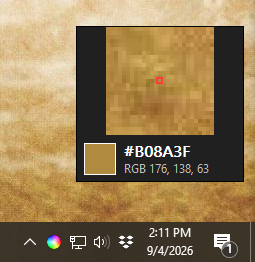
A tiny, single-file Windows color picker that lives in the system tray. Click the tray icon to zoom in on any pixel, then pick it. The color hex code is copied to the clipboard.
Building
Requires a MinGW-w64 toolchain (gcc, windres, make) — e.g. MSYS2.
With make
make
This produces ColorPicker.exe with the icon embedded.
Manual build
Without the icon:
gcc color-picker.c -o ColorPicker.exe -mwindows -municode -lgdi32 -luser32 -lshell32 -ladvapi32 -lm
With the icon:
gcc color-picker.c -o ColorPicker-noico.exe -mwindows -municode -lgdi32 -luser32 -lshell32 -ladvapi32 -lm
./ColorPicker-noico.exe --make-ico
windres icon.rc -O coff -o icon.res
gcc color-picker.c icon.res -o ColorPicker.exe -mwindows -municode -lgdi32 -luser32 -lshell32 -ladvapi32 -lm
Usage
Run ColorPicker.exe. A tray icon appears. Click it to pick a color.
Right-click the tray icon for settings and recent colors.